New Accounts:
- In WealthScape click "Service > New Account > Set Up New Account"
- Select the type of account that you would like to open

- Click "Change/Add additional"

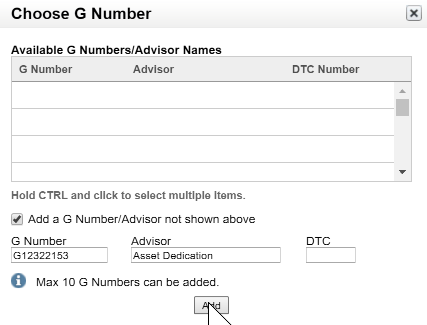
- Click the checkbox next to "Add a G Number/Advisor not shown above", input G12322153 in "G Number" and Asset Dedication in "Advisor", and click Add.
- If you don't operate a wrap fee program, make sure Asset Dedication's G#, G12322153, is above your G#.
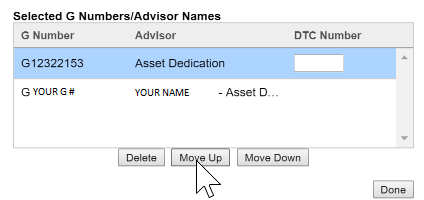
- Follow the on-screen instructions
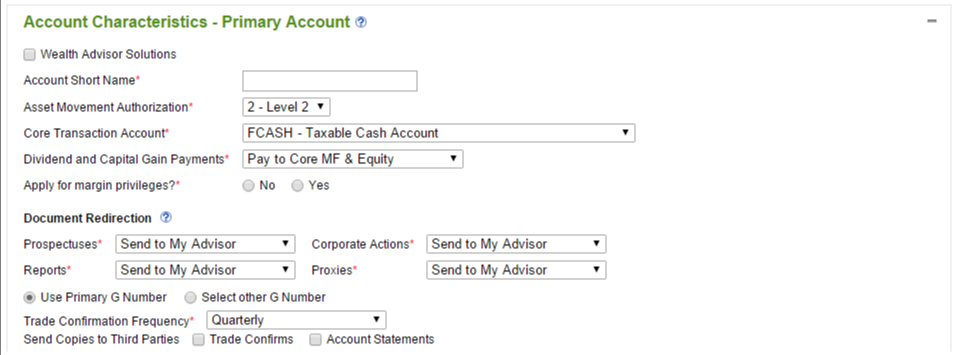
- Select the settings shown in the picture below
- Complete the rest of the form
- Submit the signed form to Fidelity
Existing Accounts (Retail):
- In WealthScape click "Service > Forms Library"
- Find and complete the "Add Advisor to Fidelity Personal Investments Account" form. Please submit a separate form for every account that has different account owners. For example, if you put John's IRA and Jane's IRA on the same form, Fidelity will reject the form even though John and Jane are married and both signed the form.
- Submit the signed form to Fidelity
Existing Accounts (Institutional):
- In WealthScape click "Service > Forms Library"
- Find and complete the "Advisor Authorization and Termination" form. Please submit a separate form for every account that has different account owners. For example, if you put John's IRA and Jane's IRA on the same form, Fidelity will reject the form even though John and Jane are married and both signed the form.
- Submit the signed form to Fidelity