Existing Accounts:
- In the Forms Library, search for the applicable form shown below
- Nonretirement Account Separately Managed Account Addendum (Click here for a sample)
- Retirement Account Separately Managed Account Addendum (Click here for a sample)
-
Termination/Replacement and New Account Establishment for Managed Accounts (Click here for a sample)
- Note: Use this form to remove the prior Separate Account Manager from the account and add Asset Dedication to the account.
- Submit the signed form to Fidelity
New Accounts:
- In the Forms Library, search for the applicable form shown below
- Separately Managed Account Application - Personal and Trust Registrations
- Separately Managed Account Application - Business Registrations
- Separately Managed Account Application/IRA - Traditional, Rollover, Roth IRA, and SEP IRA
- Separately Managed Account Non-Fidelity Prototype Retirement Account Application
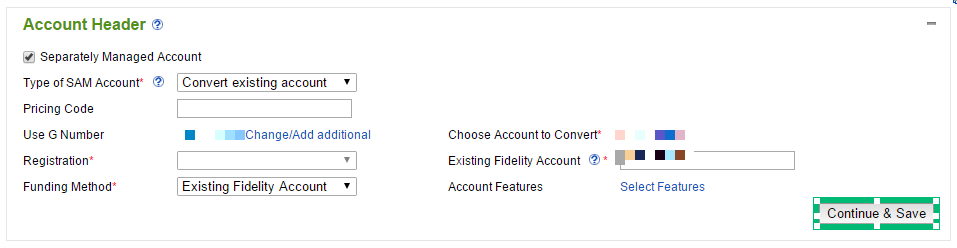
- Select the settings shown in the picture below
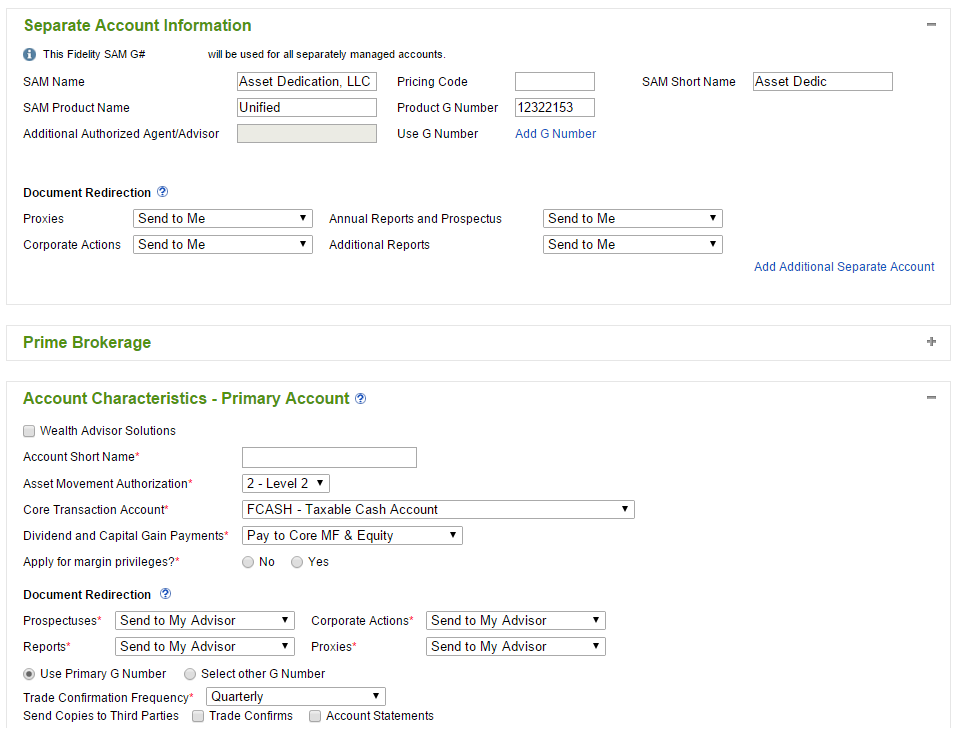
- Input the managed account settings shown below
- Complete the rest of the form
- Submit the signed form to Fidelity